
Power supply instructions for the G1 camera module
Power supply instructions for the G1 camera module
The G1 camera module is a full-featured camera module developed by Huaxing Video based on the iCatch chip.Camera ModuleThe combination includes the camera core motherboard and camera module. A WIFI expansion board/network expansion board can be added according to the needs. The G1 camera module has a variety of power supply methods to meet the product needs of different users. The following is the power supply description of the G1 camera module:
1. Mainboard battery interface power supply
Use a 6.6V~8.8V lithium battery to power the G1 camera module through the battery interface of the motherboard. Voltages higher than 8.8V may burn out, and voltages of 6.6V will cause low power shutdown. It is recommended to use7.7V high voltage and high density battery。

2. Motherboard USB Type-C port power supply
The G1 camera module USB port supports USB standard 5V power input, which can automatically power on the G1 camera module. The G1 camera module with the gimbal module cannot be powered by USB alone.
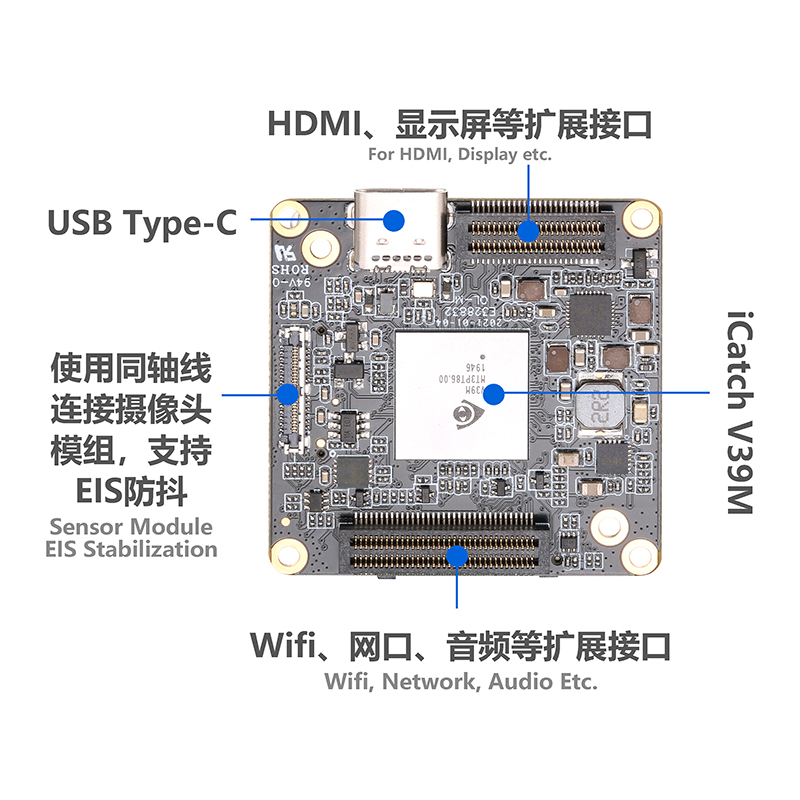
USB is connected to the computer for power supply, and the system enters the USB mode by default. Short press the power button to enter the PCCAM mode.
USB connection to a power bank can power the main G1 public version prototype;
The USB is connected to a power adapter (5V2A recommended) for power supply, which can power the G1 public version. It cannot be powered by a charger that supports fast charging.
Ordinary charger: maximum output parameters 5V/1A, 5V/2A.
Fast charging charger: maximum output parameters 9V/2A, 10V/2A, 10V/2.25A, 5V/4.5A or 4.5V/5A, 10V/4A, 5V/8A, 20V/3.25A, 11V/6A, 20V/5A.
3. Power supply from expansion board power supply interface
G1-N-V4.0 network port board:
With G1-M-V3.0 camera motherboard,Other camera modules except PTZ moduleUse, this interface supports power supply between 5V~12V, so that the camera can be turned on automatically.

Special attention: collocationG1-M-V3.0 Camera MainboardWhen using the PTZ camera module, the battery port of the mainboard must be powered (between 6.6V and 8.8V), and then another circuit is used to power the 2Pin of the network port board (between 5.5V and 8V), which can automatically power on the PTZ camera module.
G1-N-V5.0 network port board:
MatchingG1-M-V3.0 Camera MainboardUse, this power supply interface supports the use of DC power supply between 8V~24V (the highest 18V is recommended, 18V~24V power supply is unstable), or lithium battery type 8V~16.8V power supply, so that the camera module automatically turns on. Note: When the network port power supply needs to be above 12V, the 4Pin interface of the network port board needs to be directly connected to the battery end interface of the G1 mainboard.

Special attention: collocationG1-M-V3.0 Camera MainboardWhen using the PTZ camera module, the battery interface of the mainboard must be directly connected to the 4-pin interface of the network port board, so that the voltage output by the network port can be stepped down to 8V for the mainboard, and then power the PTZ motor, so that the PTZ camera module can be automatically turned on.

This interfaceG1-M-V3.0 Camera MainboardThe battery terminal interface is directly connected to reduce the voltage.
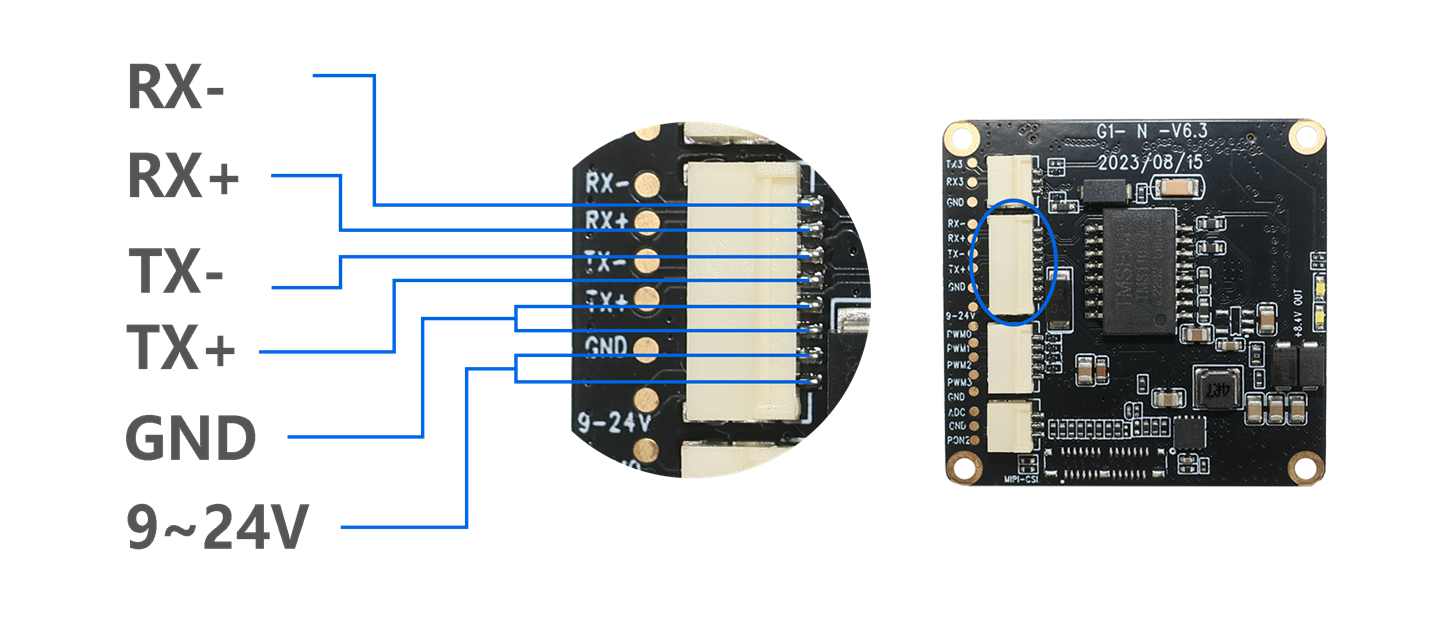
G1-N-V6.3 Network port board:
Used with G1-M-V6.2 camera motherboard, this power supply interfaceSupports using a DC power supply between 9V and 24V, or a lithium battery type of 8V to 16.8V to power the camera module automatically. When working with the gimbal camera module, only this power supply is required, and there is no need to connect to the battery interface of the motherboard.
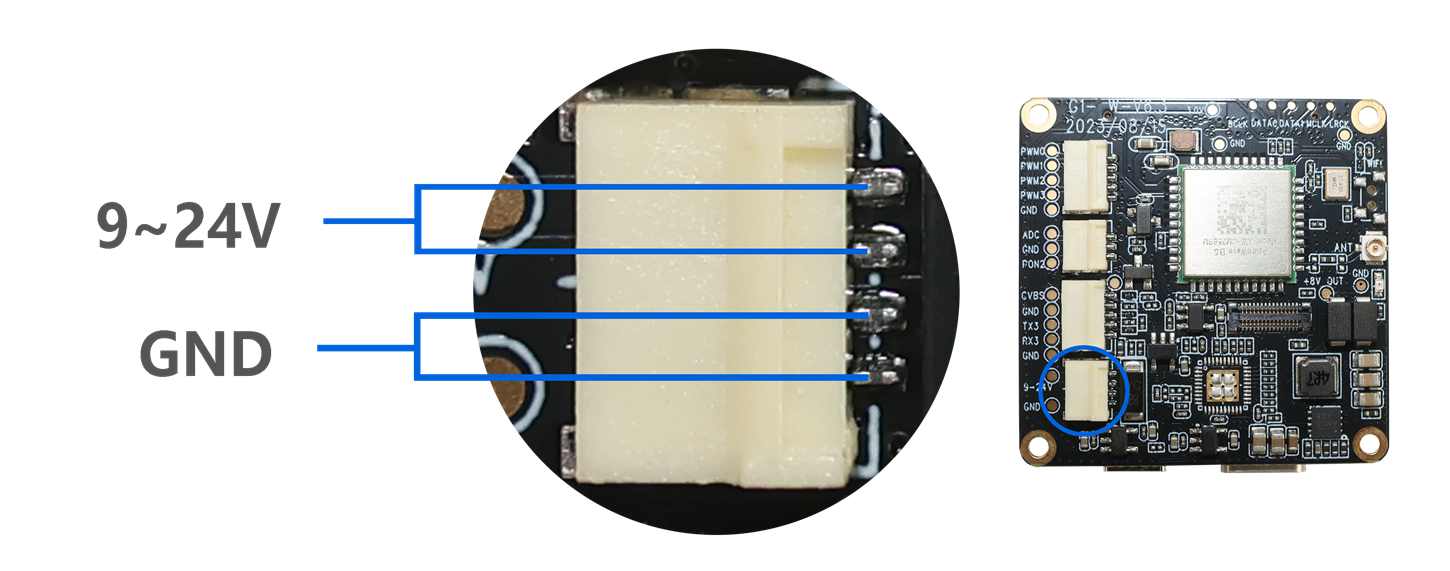
G1-W-V6.3 Wifi Board:
With G1-M-V6.2 cameraImage mainboard use,The power supply interfaceSupports using a DC power supply between 9V and 24V to automatically power on the camera module.
The mainboard USB port and the expansion board power supply port cannot be powered at the same time, otherwise they may burn out easily.