G1 camera module operation instructions for RTSP pull-streaming in STA mode
Operation instructions for RTSP pull-streaming of the camera module in STA mode
G1 camera module, which is a full-functional camera module combination developed by Huaxing Video based on the V39M chip of Xinding Technology iCatch, includes the core motherboard of the camera, camera module, and according to the demand, an additional WIFI expansion board/network expansion board can be superimposed. The G1 camera module with the wifi board, can support the use of single-frequency 2.4G or 5G wireless Wifi function. The default wifi mode is AP mode, and it can also be set to STA mode for operation. The G1 camera module with the wifi board can perform rtsp streaming in STA mode, The following is the description of the specific operation steps:
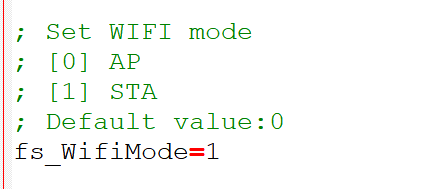
1. Set camera moduleThe wifi mode is set to STA mode
Put the corresponding ini configuration file in the card, set the wifi mode to STA mode, and save the settings. As shown in the following position:
2. Set the SSID and password of the router wifi network
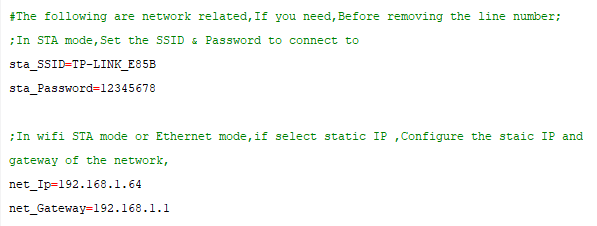
In the configuration file, set the SSID and password of the router wifi network, and then set the IP and gateway of the camera module. The camera module is turned on and then turned off, and the parameters set in the configuration file take effect when it is turned on again. The G1 camera module turns on wifi , and the computer connects to the wifi network set in the configuration file.
3. Ping the network
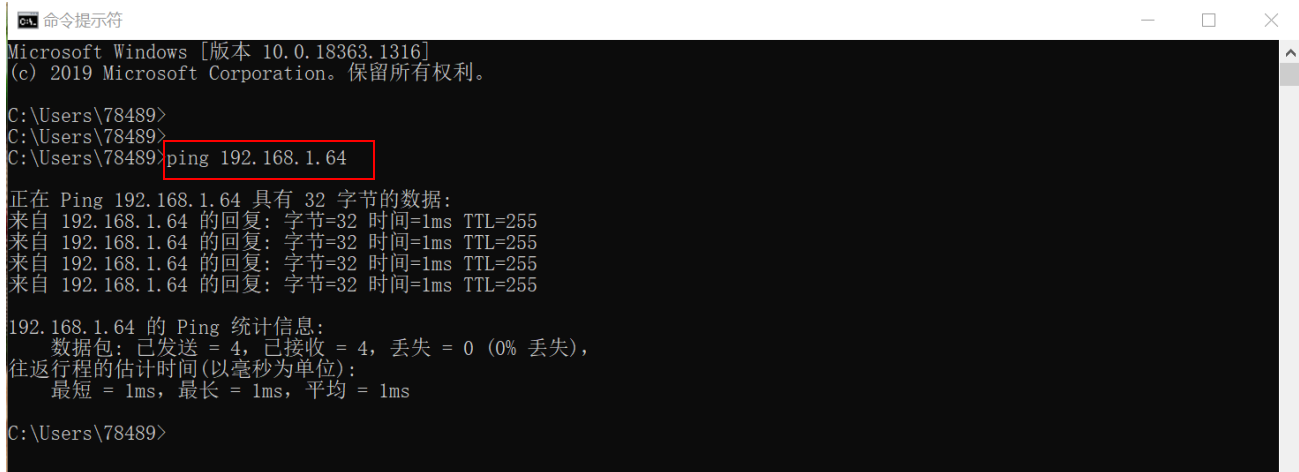
The computer calls cmd Enter the command ping 192.168.1.64 to check whether the communication is available. As shown in the following figure, it shows that the network has been ping connected.
If the network is not pinged, please check whether the gateway of the computer network is 192.168.1.1. If not, the gateway in the configuration file needs to be set to be the same as the gateway of the computer.
For example, if the gateway of the computer network is 192.168.3.1, then in the configuration file, it needs to be set to:
net_Ip=192.168.3.64
net_Gateway=192.168.3.1
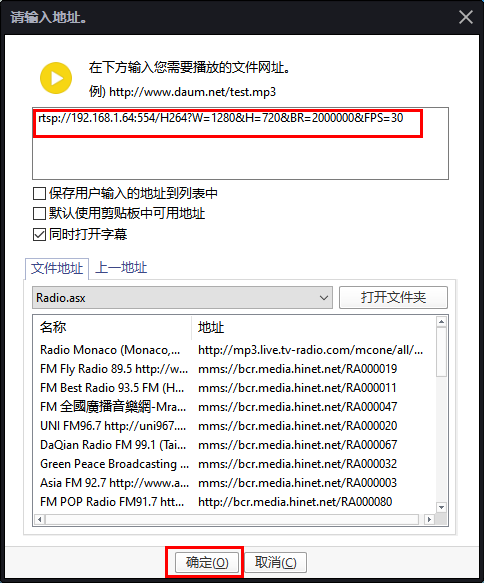
4. Pull the rtsp video stream in the player
Open the PotPlayer player installed on the computer, click the upper left corner with the mouse to open the main menu dropdown list, move the mouse to open and move to the right list, and click the left mouse button "Open Link", enter the address "rtsp://192.168.1.64:554/H264?W=1280&H=720&BR=2000000&FPS=30", Then select OK to display the picture of the current camera module.